
GasView
Which CNG station in Pune will actually fill the tank? My co-founder and I build GasView to answer that: whether a station has gas, how long the queue is, and whether the pressure is high enough.
Role
Co-founder, product and engineering
Platform
Android, iOS in review
Status
Since
October 2025
The short version

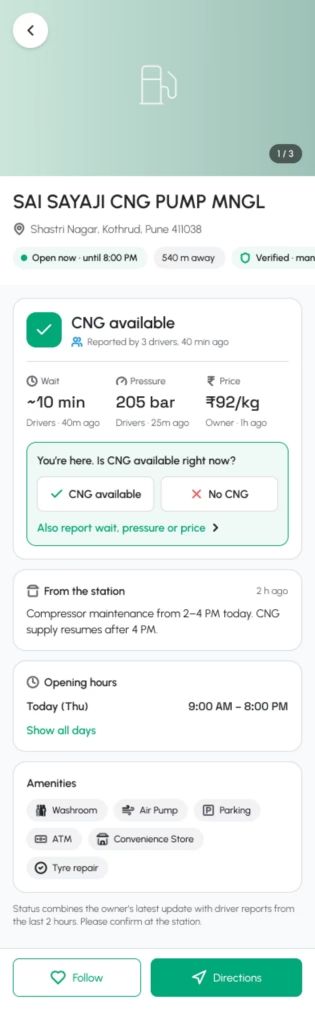
Fuel costs almost the same at every CNG pump in a city, so drivers do not need price comparison. They need certainty: does this station have gas, how long is the queue, and is the pressure high enough to fill the tank. GasView answers from two sources, the station and the drivers standing in its queue, and says how old every answer is.
Where it started

In my own CNG queues in Pune. I have waited in a line that barely moved, reached the front of another as the station ran dry, driven on to a third, and finally filled half a tank because the pressure was low. Every driver around me had the same evening. For rickshaw drivers it is lost earnings.
Why pressure, not price
In the US, fuel apps compete on price. In India, prices set by the oil and gas companies barely differ within a city. Low pressure, on the other hand, is something every CNG driver has sat through, and no other app showed it.
How it works
Drivers and stations write to the same place. Station owners update their pumps from an app or the web; drivers in the queue confirm or correct them. One backend decides which value to show and pushes news to everyone who follows a station.
Every box is a real part of the codebase. On the site the drawing sketches itself as you reach it, then a report travels in and news goes out.
The hard part
GasView is only as good as its latest report, and a driver in a queue has one free hand and a minute at most. So we took everything out of the way. Reporting is three taps and needs no account; an anonymous reporter is kept only as a hash. We dropped a rule that rejected reports from more than a kilometre away, because phone GPS in a crowded forecourt is often wrong. And the reason to open the app is following your usual station; reporting rides along.
Which number to trust
A wrong “available” breaks trust faster than no data at all. So every value carries its source and its age, and queues show in three bands instead of minutes until the data earns more precision.
Every value in the app carries its source and its age, so the screen can say “reported by drivers, 12 minutes ago”. Checked per field: availability, wait, pressure and price each resolve on their own.
Low
Moderate
Heavy
The reading here is “moderate”. The marker is the same turmeric triangle as the current page in the menu.
Built for stations too
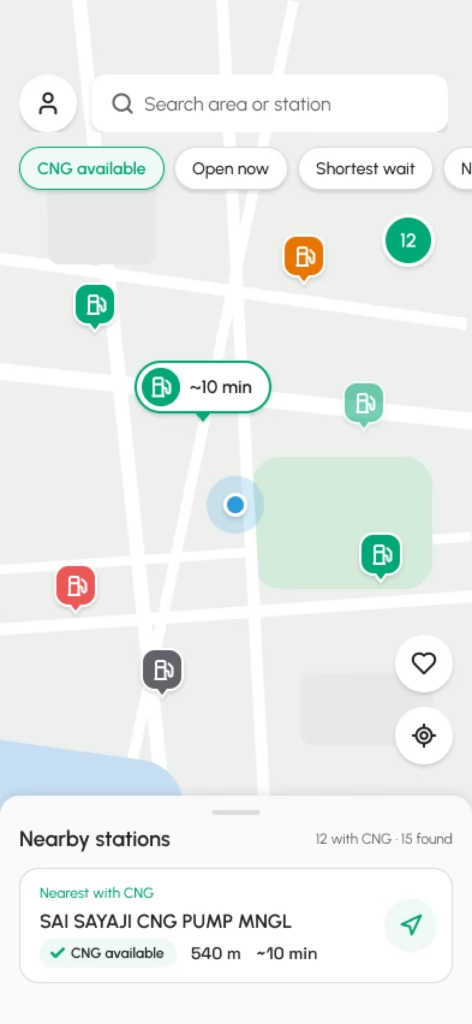
A busy CNG station does not need more customers. It needs a queue it can manage. So owners get their own side of the app: update gas, pressure and wait in a few taps, add up to five managers by scanning a QR code, and send a message to every driver who follows the station when the compressor is down or the line is short.
What drivers see
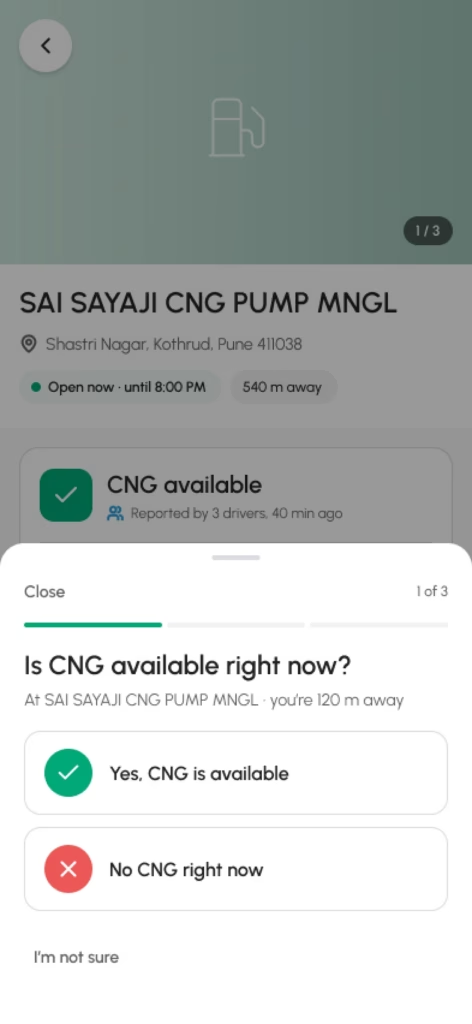
In three languages
Most people in a Pune CNG queue do not read English first. GasView ships in English, मराठी and हिंदी, every screen, with dates and units that follow the language. A check in the build stops any new text from being written straight into the code instead of the translation files.
What we got wrong
The first station data was seeded, and some of it went old while still looking current. A driver cannot tell a value from this morning from one from last month, so now every value shows its source and its age, and any driver can correct it. And the first iPhone build was turned down by Apple, over sign-in and privacy labels; we fixed both and learned to read the review rules before the build, not after.
What comes next

Depth before breadth: more of Pune, updated more often, before any new city. A version that keeps working offline and syncs when the signal returns. And a free tool that makes a station’s own day easier, so updating GasView is a side effect of running the pump.
Next case study
This site
A block theme built in public, from brand to theme.json to a mega menu block.